
Legal Workflows in Practice: 7 Examples and When Humans Step In
Table of contents
A customer contract from Sales, a supplier agreement from Procurement, a question from a business unit: much of Legal's workload consists of recurring tasks. The seven examples show how to define those workflows, where the standard is enough and at which point a lawyer decides.
A legal workflow is a defined process for a recurring task in the legal department. It defines what triggers the process, which steps follow, which conditions require human intervention and how the outcome is documented. It only becomes useful once it is also clear who takes the decision.
The critical question is where automation ends and human judgement begins. Many collections of legal workflows list processes but leave that question open, although it is the one that matters most to a legal team. A customer contract that meets every approved standard does not need another individual legal review. If the customer demands unlimited liability, the responsible person decides.
All seven examples therefore follow the same four-part structure:
- Trigger: the event that starts the workflow, such as an incoming contract or a date.
- Steps: what the workflow performs automatically, based on your playbooks, templates and policies.
- Threshold: the defined condition at which the workflow must not continue on its own and a person decides. It can be an amount, a specific contractual scenario or a clause the playbook does not cover. A result that cannot be classified clearly, or missing information, also triggers a handover.
- Decision owner: the person or role that takes the decision once the threshold is reached.
Every workflow also needs an audit trail. At the end, it is clear what was reviewed, against which standard and who approved it. Without an audit trail, you can neither improve a workflow nor justify its outcome.
Processing, approval and the conclusion of a legally binding contract are three separate steps. The workflow processes the matter. A designated person reviews and approves the outcome on its substance: depending on the workflow, Contract Management, the business unit or a lawyer. That approval does not replace the authority to bind the company. Who may conclude a contract is governed by the company's rules on representation and signing authority.
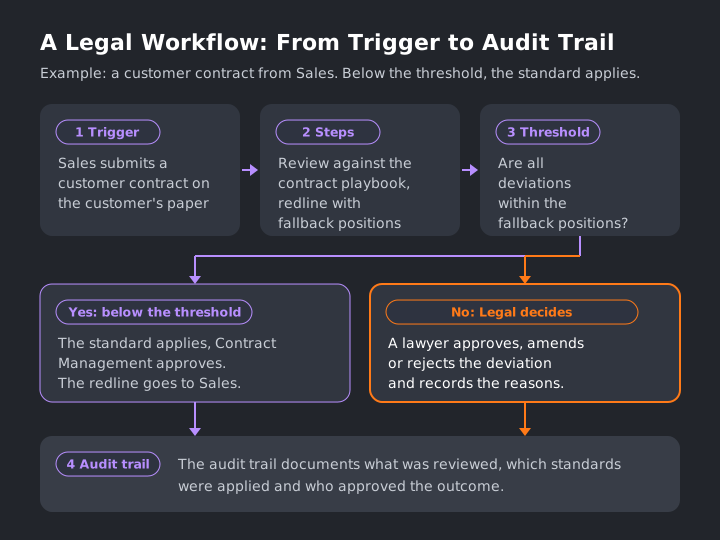
Figure 1: Below the threshold, the standard applies and Contract Management approves the result. Above it, the responsible person decides. Both paths end in the audit trail.
Seven Legal Workflows from In-House Legal Teams
The examples come from manufacturing, logistics and medtech. The thresholds in them are illustrative. Your legal team sets the values that apply to you.
1. Managing Incoming Legal Requests
At a logistics company, requests come in via email, chat or phone. Most are routine, some are urgent, and many arrive without all the necessary details.
- Trigger: A request comes in from a business unit, for example from dispatch.
- Steps: The workflow captures the topic, the counterparty and the deadline, assigns a category and sets a priority. It then routes the request to the person responsible. If information is missing, it follows up.
- Threshold: If the request concerns litigation, a public authority or a deadline of less than three working days, it goes straight to the Head of Legal.
- Decision owner: The person responsible for the category, and above the threshold the Head of Legal.
Every request then has a category, a deadline and an owner.
2. Reviewing a Customer Contract from Sales Against the Playbook and Producing a Redline
A machinery manufacturer sells equipment to industrial customers, many of whom submit contracts based on their own terms. The key contractual issues tend to be the same, and Legal has a playbook for them.
- Trigger: Sales submits a customer contract on the customer's paper.
- Steps: The workflow reviews every relevant clause against the playbook, from the limitation of liability and payment terms to the term, governing law and jurisdiction. Where a clause departs from the standard, it proposes the fallback position as an amendment. The result is a redlined version of the contract, showing the proposed amendments for the counterparty.
- Threshold: If every deviation can be covered by a fallback position, Contract Management approves the redline and it goes to Sales. If the customer demands unlimited liability, a contractual penalty or a jurisdiction that has not been approved, Legal decides. The same applies to clauses the playbook does not cover.
- Decision owner: Contract managers within the fallback positions, a lawyer beyond them.
What makes a good redline is covered in our article on contract redlining. A legal workflow does not necessarily require a playbook. It can also operate based on defined policies and templates. For customer contracts, though, the playbook sets the positions. If you do not have one yet, you can build it with the Contract Playbook Creator.
3. A Supplier Contract from Procurement: Liability, Warranty and Supplier Terms
A medtech manufacturer buys components from dozens of suppliers. Procurement negotiates prices and dates, and the suppliers send their own terms and conditions. The main legal risks typically arise in three areas.
- Trigger: Procurement submits a framework supply agreement or a purchase order with the supplier's terms.
- Steps: The workflow checks liability, warranty and the supplier's terms against the purchasing guidelines. It checks the applicable liability cap, how long the warranty runs and whether the deadline for notifying defects is compatible with the company's goods inspection process. It also flags clauses through which the supplier's terms are meant to override the company's purchasing conditions.
- Threshold: If the liability cap is below the annual order value, or the supplier excludes consequential damages, the contract goes to Legal. The same applies to any deviation from the quality assurance agreement and to clauses that are not covered by existing guidelines.
- Decision owner: Below the threshold, Procurement together with Contract Management. Above it, Legal, together with Regulatory Affairs on quality matters.
Supplier contracts are often high in volume, yet each may contain different contractual risks. This is where AI contract review shows its value: it assesses each of these clauses against the company's guidelines.

4. Reviewing a Data Processing Agreement
A logistics company introduces new shipment tracking software. The vendor processes recipients' data on the company's behalf, so a data processing agreement (DPA) is needed. Not every software vendor is a processor, however. Legal determines whether the vendor acts as a data processor before the workflow begins.
- Trigger: A vendor identified as a data processor submits its DPA for review.
- Steps: The workflow reviews the DPA first against the company's own playbook and then for the mandatory statutory content, including processing on instructions, technical and organisational measures, subprocessors, deletion and audit rights.
- Threshold: If mandatory content is missing, or the vendor wants to use the data for its own purposes, the DPA goes to Legal. Where an internal policy requires it, the same applies to subprocessors outside the EU, the EEA and Switzerland. Such transfers are not necessarily unlawful. They may be permitted, for example, under an adequacy decision or subject to appropriate safeguards. Whether those conditions are met is for Legal to assess.
- Decision owner: Below the threshold, Contract Management approves, or the business unit if it reviews the DPA itself. Above it, Legal decides together with the data protection team.
Every point to check is listed in our DPA checklist.
5. Escalating Contract Deviations for Approval
This workflow is embedded in all the others but deserves separate attention, because it determines how exceptions are escalated and approved. The example comes from an industrial company with several sites.
- Trigger: Another workflow reports a deviation above the threshold, such as a liability clause outside the fallback position.
- Steps: The workflow summarises the deviation and names the playbook requirement it affects. It proposes a position and assigns the responsible person a task with a deadline.
- Threshold: An escalation ladder applies. Up to a set contract value, Contract Management decides. Above it, the Head of Legal decides, and on deviations from group policy the General Counsel.
- Decision owner: The named person approves, amends or rejects. The rationale behind the decision is documented as part of the case record.
Without an escalation ladder, every deviation lands with the same person, who becomes the bottleneck. How threshold, role and reasons work together is covered in our article on AI agents in the legal department.
6. Managing Contract Deadlines and Renewal Notices
At a medtech company, service, maintenance and licence agreements renew automatically unless someone gives notice in time. The relevant dates are documented in the contracts, but are not always monitored systematically.
- Trigger: A contract is filed, or a date approaches.
- Steps: The workflow extracts the term, the notice period, the renewal clause and the required form of notice. It then assigns the responsible person a task in good time.
- Threshold: If a contract with a high annual value or with exclusivity is about to expire, the workflow also informs Legal.
- Decision owner: The business unit decides whether to renew, renegotiate or terminate. If the form or the deadline is unclear, Legal reviews it.
The workflow may seem straightforward. Yet a missed deadline binds the company for another contract period, and a miscalculated one has the same effect. If a date or notice period cannot be determined reliably, the contract is therefore escalated for human review.
7. Identifying Clauses Across the Contract Portfolio, for Example After a Change in the Law
The revised Swiss Federal Act on Data Protection has applied since 1 September 2023. A Swiss logistics company wants to know which of its contracts still refer to the old act. Such a reference does not automatically make a clause invalid. It does suggest that a data protection clause was drafted from an older template and should be reviewed.
- Trigger: A change in the law, a court decision or a new group policy affects existing contracts.
- Steps: The workflow searches the contract portfolio for the clause, including in different wording. It lists the relevant contracts, including counterparties and contract terms, and prioritises them by urgency.
- Threshold: Contracts in which the clause is missing, departs from the new standard or cannot be classified clearly go onto a review list for Legal.
- Decision owner: Legal decides whether an amendment is needed at all. If it is, Legal renegotiates, sends an addendum or waits for the next renewal.
Without automation, this would require reviewing each contract individually. Completeness is what counts here: the workflow must also find different wording, and Legal uses sample checks to assess whether relevant contracts may have been missed. For analyses across the whole contract portfolio, Legartis offers Contract Insights.
The legal framework for examples 3 and 4 differs slightly by country. The main legal bases are listed below, without any claim to completeness.
Legal Framework by Jurisdiction
Germany. Art. 28 GDPR applies to the DPA. Between businesses, supplier terms are subject to judicial review for unfair terms under Section 307 in conjunction with Section 310(1) of the German Civil Code (BGB). The buyer's rights for defects are governed by Sections 434 et seq. BGB, and between merchants the duty to give notice of defects under Section 377 of the German Commercial Code (HGB) applies.
Austria. Art. 28 GDPR applies to the DPA, supplemented by the Austrian Data Protection Act. Standard terms are subject to an incorporation review under Section 864a and a review for unfair terms under Section 879(3) of the Austrian Civil Code (ABGB). Warranty is governed by Sections 922 et seq. ABGB, and between businesses the notice of defects under Section 377 of the Austrian Commercial Code (UGB) applies.
Switzerland. Processing by processors is governed by Art. 9 of the Federal Act on Data Protection (FADP). For standard terms between businesses, the law provides no general review for unfair terms, and the courts apply the rule on unusual clauses. Warranty in a sale is governed by Art. 197 et seq. of the Swiss Code of Obligations (CO), and the duty to inspect and give notice by Art. 201 CO. Under Art. 100(1) CO, an advance exclusion of liability for intent and gross negligence is void.
When Sales and Procurement Review Contracts Themselves: Guardrails and Responsibilities
Many legal teams want Sales to handle its standard contracts, and Procurement its purchase orders, without going through Legal. This reduces the workload for Legal, provided three questions have been answered in writing. What may the business unit approve on its own? From which threshold does Legal take over? And who is accountable for the associated risks?
The third question is the one most often forgotten. In practice, a clear allocation of responsibilities works well: price, quantity and delivery date stay with the business unit as commercial risk. From the threshold upwards, Legal is responsible for any deviation from the playbook. Below the threshold, the standard Legal approved in advance applies, and Legal stands behind that standard.
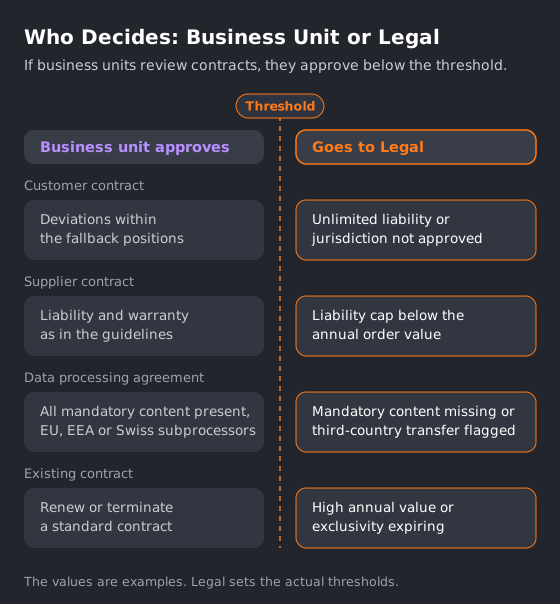
Figure 2: Where Sales and Procurement review contracts themselves, the business unit approves below the threshold. Above it, Legal decides. In both cases, only someone authorised under the company's representation and signing rules may conclude the contract.
Five rules are usually enough for the guardrails:
- The business unit works only with approved templates and the fallback positions from the playbook.
- All escalation thresholds are documented centrally and maintained by Legal.
- The signing policy stays as it is. A workflow does not replace signing authority.
- Every matter leaves an audit trail, even if nobody from Legal has reviewed it.
- Legal uses sample reviews to check whether playbooks and escalation thresholds are still appropriate.
These guardrails also allow contract managers without a law degree to handle clearly defined standard cases and to escalate deviations to Legal. They decide within the fallback positions and recognise when a deviation goes beyond them. They do not have to assess that deviation. Whether a person or a Legal Agent runs the workflow makes no difference to the guardrails.
Where Human Judgement Remains Essential
Legal workflows do not necessarily stop when complexity increases. They reach their limits when no clear standard exists or when the standard does not clearly cover the case.
Three areas therefore stay with lawyers. The first is negotiation strategy: a workflow knows the predefined fallback positions, but not the commercial relationship with the customer or the long-term value of a concession. The second is new contract types for which there is neither a playbook nor a policy, because until someone has defined what good looks like, no workflow can review against it. The third is individual high-risk matters, such as a joint venture or a settlement in litigation. Workflows help with the groundwork here too, but the decision stays with a person.
Even with a playbook, a workflow reaches the threshold when information is missing or its result is not clear. It then hands over to a person.
Choosing Your First Legal Workflow
The best first workflow has high volume, a clear standard and low risk. In many legal departments, supplier contracts and data processing agreements meet those conditions once a playbook exists for them. These contracts occur frequently, their key positions repeat, and they allow for clearly defined escalation thresholds.
If you want to automate legal workflows, start by assessing your existing contract volume and identifying recurring deviations from your standards. How many supplier contracts came in last quarter, and where did they depart from the standard? This analysis helps identify where automation is likely to deliver the greatest value. Legal then sets the threshold according to risk: the legal consequences, the financial impact and who is responsible.
Before deployment, test the workflow against a representative set of contracts, unusual ones included, using defined review criteria, and analyse the errors. Past matters are a useful comparison, but not proof, because earlier decisions can be wrong too. Above all, test whether the workflow reliably recognises unknown or ambiguous cases and passes them on for human review.
When you choose software, our ten questions to ask every vendor help.
Vendor Example: How Legartis Automates Legal Workflows
The seven workflows above apply regardless of the product. In the Legartis Agentic Legal AI Workspace, recurring workflows can be configured as Frequent Actions within the Legal Agent. For the supplier contract from example 3, you describe what needs doing to the Legal Agent, in your own words: review the contract against the playbook, produce a redline and assign the responsible person a task with a deadline. The Legal Agent writes the full instruction from your description and saves it as a reusable Frequent Action. You can view the instruction and change it at any time.
When the next supplier contract arrives, drop it straight onto the Frequent Action. It operates according to your playbooks, guidelines and templates. If you share it with your team, everyone runs it the same way, to the same guidelines. The result remains a proposal that the person responsible reviews. A multi-layered quality system makes AI quality measurable and gives you control over it. You can find out more on the Legal Workflow Automation page.
Which legal tasks are best suited to Legal AI, where are its limitations and what should you consider before implementation? The Legal AI Guide helps you assess the options systematically.
FAQ
Frequently asked questions
A legal workflow is a defined process for a recurring task in the legal department. It defines what triggers the process, which steps follow, which conditions require human intervention and how the outcome is documented. It also defines who decides when the workflow reaches the threshold.
Workflows with high volume, a clear standard and low risk work best. Often these are standard contracts for which a playbook already exists, such as supplier contracts or data processing agreements. Notice periods and requests from business units usually come next.
Legal sets that in advance as an escalation ladder. Contract managers typically decide on deviations within predefined fallback positions. Beyond them a lawyer decides, and for major deviations the Head of Legal or the General Counsel. The reasons are recorded with the matter.
A contract lifecycle management (CLM) system manages contracts across their whole lifecycle, from drafting to renewal or termination. A legal workflow describes a single work process, such as the review of a supplier contract, and defines who decides at which threshold. It can run inside a CLM system, but it does not need one.
Explore Related Insights
More articles related to this topic



Start with Legartis Today!
Talk to us about your business case or test Legartis right away!