
Legal Workflow Software for Legal Teams: What to Check Before You Buy
Table of contents
Every demo shows that a workflow runs. Only a test with your own contracts shows whether it applies your standards reliably and hands exceptions to the right person. The ten questions below are built to find that out.
Legal workflow software lets legal teams define recurring processes once and execute them consistently to their own standards: the customer contract from Sales, the supplier contract from Procurement, the quick question from a business unit. When you buy it, the number of steps a product automates matters less than you might think. What matters is how reliably it applies your standards, and what happens to the cases that do not fit. If you are still deciding which workflows to start with, our seven examples from in-house legal teams are a good place to look.
Workflow Automation and Agentic Legal AI
Two kinds of product now sell under the name legal workflow software, and the difference decides what you are actually buying. Classic workflow automation follows fixed rules. A form goes to a set person, a file lands in a folder, a contract above a certain value triggers an approval. Those rules can evaluate content, and some workflows call an AI model to do it, but the sequence itself is fixed in advance. Agentic Legal AI handles multi-step tasks according to the individual case. It reviews a contract against the playbook, draws on templates, the contract repository or legal sources, and chooses the next step within limits you have set: a redline, a follow-up question or a handover to a lawyer.
The first automates how work moves through the organisation. The second takes on parts of the legal work itself. Before you commit, you need evidence of how reliably it performs.
Ten Questions to Ask Every Legal Workflow Software Vendor
A demo shows a product in a prepared environment. You only see how it handles your contracts and your data if you ask for it directly, so each question below comes with a piece of evidence: a test result, a document, a log or a demonstration in your own environment. Slides and website copy do not count. The first three questions cover the quality of the legal work, questions 4 to 6 data protection and security, questions 7 to 9 day-to-day control, and the last one integration.
- How does the vendor prove that the system applies your standards reliably? A sample contract in a demo tells you little. What counts is a test with your own contracts and your own playbook. Evidence: test results for a representative set of your contracts, with defined review criteria, results for each criterion and an analysis of the errors.
- What happens to unclear results and exceptions? Every system meets clauses the playbook does not anticipate. It should flag those cases rather than silently classify them as acceptable. Evidence: an edge case from your own portfolio, reviewed live, showing the point at which the system hands it to a person.
- What does the system handle on its own, and when is human approval required? You decide which cases the system may close to your standard and above which threshold a lawyer takes the decision. The product has to be able to reflect that line. Evidence: approval steps set up to your thresholds in a trial account.
- Where is our data processed, and who else is involved? This covers every place your data is stored or handled: storage, processing in the language model, backups and support access. Many products also rely on a cloud provider and a model provider who may get to see your contracts. Evidence: the locations named in the contract or the data processing agreement (DPA), a current list of subprocessors with location and purpose, and the notification procedure for changes.
- Is any model trained on our data? The answer has to hold for the vendor and for every model provider behind it. Evidence: a contract clause that excludes training on your content. A line in the FAQ is not enough.
- Who exactly holds the ISO 27001 certificate? Sometimes the certificate belongs to the data centre, not to the vendor. Evidence: the certificate, with its scope and expiry date.
- What is logged, and which version was in effect? For every completed workflow you should see who started it, which standard applied, what the system proposed and who accepted the result. If someone changes a fallback position, it must still be clear which version applied to a contract from last quarter. Evidence: the log of a real workflow, opened during the demo, and the version history of a playbook with a date and a name for every change.
- Who has permission to do what? The person who builds a workflow is rarely the one who later changes it, starts it or approves its result. Without roles, every standard remains a suggestion. Evidence: the permissions model, demonstrated with two test accounts.
- How can we exit the platform? Playbooks, workflows and logs are your knowledge, and that knowledge has to outlast the product. Evidence: an export in an open format and a contract clause on what happens to your data when the contract ends.
- How does the product fit with Word, Outlook, SharePoint and your contract lifecycle management (CLM) system? Lawyers work in Word and in their inbox. A tool that makes them leave both is easily bypassed. Evidence: the integration running live in your environment or in a trial account.
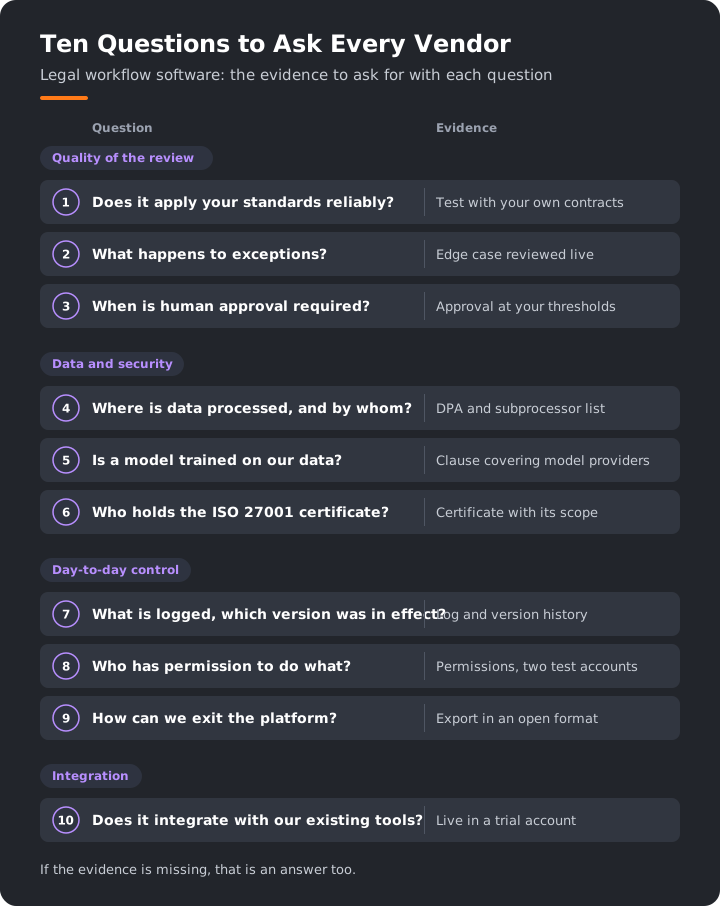
Questions 4 to 10 can be shared directly with IT, information security and procurement. The answers to the first three can only be judged by Legal, because only Legal knows its standards and where a mistake becomes expensive. And if a vendor cannot provide evidence for a question, that is an answer too.

Law Firm or Legal Department: Different Priorities
Many products sold as legal workflow software were built for law firms first. The line between the two is not rigid. Legal departments use matter management too, and law firms work with playbooks and workflows. The key difference lies in the primary use cases each product was designed to support.
- Starting point: In a law firm, work usually belongs to a file and a client matter. In a legal department, it often starts with a request from Sales or Procurement.
- Time: Law firm software is built around time recording and billing. A legal department sends no invoices. In-house legal teams, by contrast, need to demonstrate operational efficiency and how they allocate their resources.
- Control: Client intake and conflict checks are mandatory for law firms. In a company, what counts are playbooks, approvals and clear thresholds above which a lawyer decides.

For your selection, check in the demo whether your most frequent workflow runs end to end without workarounds, for example the review of a supplier contract from Procurement. The product's home screen tells you little about that.
When Copilot and Power Automate Are Enough
Many companies already license Microsoft 365 Copilot and Power Automate, so the obvious question is why you would need another tool. The answer depends on the workflow, not on the product.
Often, what you have is enough. Copilot helps lawyers summarise a contract, rephrase a clause or prepare an email. Power Automate routes forms, files documents in SharePoint and sends approval requests, in several stages if needed. Flows managed in a solution have a version history, and runs from the last 28 days can be traced in the run history. Technically, a great deal is possible.
The distinction is not in the automation capabilities themselves, but in the legal expertise required to build and maintain them. A workflow engine routes work, but it brings no legal decision logic with it. The playbook, the review criteria, the quality control and the thresholds for human decisions are yours to build, test and maintain. The question is not whether Microsoft can support these workflows, but how the cost of building, testing and maintaining them compares with a specialised solution. Four scenarios make that comparison particularly relevant.
- Multiple reviewers need to apply the same standards consistently. An effective prompt is often tied to the individual who created it. If five lawyers work with five versions, you end up with five standards.
- The standard is a playbook. Standard positions, fallback positions and red lines should be applied the same way in every review, and you should be able to measure how well that works.
- You later need to show which standard applied. Power Automate gives you the run history. Which playbook position was applied to which clause is something you have to record yourself.
- Custom workflows require ongoing maintenance. A Power Automate flow usually belongs to IT. When the playbook changes, Legal needs someone to adapt the flow and test it again.
If none of these applies, stay with what you have. If two or more apply, the comparison belongs in the business case. Whether to build or buy legal software in general is covered in our article on legal software: make or buy.
Implementation Effort and Business Case
The licence is only part of the cost. You also need to account for your team's time: you define the standards, test the workflow and keep both up to date. You face that effort whether you build it yourself or buy a specialised solution.
Who sets it up? Plan for three roles. A lawyer or someone from legal operations (Legal Ops) owns the workflow and its content. IT handles sign-in, permissions and integration. Data protection and information security review the DPA and the subprocessors. Without a designated owner on the legal side, responsibility for defining and approving standards remains unclear.
Who maintains the playbook and the workflow? Playbooks need to evolve as negotiations, legal requirements and business needs change. Decide who makes changes, who approves them and how often you review the playbook. The same applies to every workflow built on it.
What do you measure before and after? A credible business case starts with a clear baseline. Measure before you begin, and use the same definitions afterwards:
- turnaround time per contract type, for example from the arrival of a supplier contract to its return to Procurement
- the share of contracts lawyers have to review from scratch
- the proportion of AI-generated suggestions accepted without changes
- the differences between two reviewers on the same contract type
- the volume of work currently outsourced to external counsel
Hours saved do not reduce staff costs on their own. The more tangible gains are shorter turnaround times on revenue-related contracts, lower external costs and a standard everyone applies the same way. One item belongs in every business case, whatever the product: the obligations that come with using AI.
What the EU AI Act Requires of You as a Deployer
The EU AI Act distinguishes between two roles. Providers develop an AI system and place it on the market. Deployers use it under their own authority (Art. 3(3) and (4) AI Act). If your legal team buys legal workflow software, your company is the deployer, and two groups of obligations follow.
AI literacy applies to every AI system. Under Art. 4, deployers take measures to support the development of AI literacy among their staff and other people who deal with AI systems on their behalf. The obligation has applied since 2 February 2025 (Art. 113(a)). Since the amendment by Regulation (EU) 2026/1744, deployers no longer have to ensure, to their best extent, that their staff have a sufficient level of AI literacy. Record who has received which training and which rules apply to use. The usual place for that is an AI policy.
The deployer obligations in Art. 26 apply only to high-risk systems. Contract review in a legal department is not on the list of high-risk uses, but a workflow that helps decide on job applications or dismissals can fall under it. Which systems count is set out in Art. 6 together with Annex III, which lists, among others, employment and workers' management (Annex III, point 4) and the administration of justice and democratic processes (point 8). Ask every vendor how it classifies its product, and get that assessment in writing together with the instructions for use. The vendor's assessment is an important reference, but the applicable legal criteria and the system's actual use remain decisive.
Regulation (EU) 2026/1744 moved the date: for high-risk systems under Annex III, the obligations apply from 2 December 2027. From then on, deployers must, among other things:
- use the system in accordance with the instructions for use (Art. 26(1))
- assign human oversight to people who have the necessary competence, training and authority (Art. 26(2))
- ensure that input data is relevant and sufficiently representative, to the extent they control it (Art. 26(4))
- monitor operation and inform the provider of risks or serious incidents (Art. 26(5))
- keep automatically generated logs, to the extent they control them, for at least six months, unless other law provides otherwise (Art. 26(6))
- inform workers' representatives and affected workers before the system is used (Art. 26(7))
Responsibility for human oversight is shared between providers and deployers. The provider has to design a high-risk system so that people can oversee it effectively (Art. 14). As the deployer, you name the people who do it. For your selection, that means a product without approval steps, logs and roles makes this job harder, even if it does not formally count as high-risk.
Swiss companies can fall under the regulation in more than one way. It can apply where the output of an AI system is used in the EU (Art. 2(1)(c)). It can also apply where a company in the EU uses the system itself (Art. 2(1)(b)). Check the individual case. What a governance model that meets these obligations looks like is set out in our article Governing Agentic Legal AI: What GCs Must Be Able to Prove.
Sources: Regulation (EU) 2024/1689 (AI Act), Art. 2, 3, 4, 6, 14, 26, 113 and Annex III, as amended by Regulation (EU) 2026/1744.
How Legartis Supports Controlled Legal Workflows
Vendor example: here is how Legartis supports a controlled legal workflow, limited to the capabilities we can substantiate with publicly available information.
In the Legartis Agentic Legal AI Workspace, recurring workflows are called Frequent Actions. They are part of the Legal Agent. You describe a task that comes up regularly, in your own words. The Legal Agent generates the necessary prompts and saves them as a Frequent Action that you can share with your team or across the organisation.
Take the supplier contract from Procurement. A Frequent Action can review it against your playbook, produce the redline, assign a task with a deadline to the person in charge and draft the email to the counterparty. That workflow is controlled at several points:
- Standards: Every Frequent Action follows an instruction you can view and change. It draws on your playbooks, guidelines, templates and relevant legal sources.
- Human decision: The result remains a proposal that the person responsible reviews.
- Quality: A multi-layered quality system makes AI quality measurable and gives you control over it.
- Traceability: Legartis keeps a complete audit trail.
- One standard for everyone: Only you see your own Frequent Actions until you share them. Once shared, Frequent Actions are available across the organisation and operate according to the same defined guidelines.
- Where you work: Frequent Actions are also available in the Word add-in. With Plans & Flows, they start on a schedule or when an event occurs.
We can answer questions 4 to 6 publicly. Legartis processes data in Switzerland and the EU, in compliance with the GDPR, and does not train models on customer data. Legartis itself is ISO 27001-certified, not just the data centre.
The same standard of scrutiny should apply to Legartis as to any other vendor. Ask us for supporting evidence, from the test with your own contracts to subprocessors, versioning, role permissions, export and the classification under the EU AI Act. You can see how Frequent Actions work day to day on the Legal Workflow Automation page.
Book a demo: bring one workflow and a few typical contracts, and go through the ten questions with our team.
FAQ
Frequently asked questions
Legal workflow software lets legal teams define recurring processes once and execute them consistently to their own standards. A typical example: a supplier contract is reviewed against the playbook, and the person responsible then receives a task. Classic workflow automation follows fixed rules. Agentic Legal AI handles multi-step tasks according to the individual case and chooses the next step within limits you have set. For legal teams, what matters is that the workflow follows their own standards and stays traceable. You can see what that looks like in Legartis on the Legal Workflow Automation page.
Contract lifecycle management (CLM) manages contracts across their whole lifecycle, from drafting to renewal or termination. Matter management organises files and matters, in law firms and in many legal departments. Legal workflow software carries out individual steps of the work: it reviews contracts, produces redlines and assigns tasks. In practice, the categories overlap. What matters when you implement a CLM system is covered in our 2026 CLM guide.
That depends on your contract with the vendor and on the confidentiality obligations that apply to the documents. Before you start, check where the data is processed, which subprocessors are involved and whether training on your content is excluded by contract. For documents covered by professional secrecy, also check whether the rules that apply allow outsourcing.
In relation to third parties, your company usually remains responsible, because it is the one using the result. The extent of the vendor's liability depends on the terms of your agreement, and many agreements limit it. So decide in advance which results need approval by a named person, depending on the risk and the consequences of the decision. Standard cases within the thresholds you have set do not need individual approval by a lawyer. Anything above them needs approval by the named person.
If the software can generate a workflow from a natural-language description, the initial setup can be relatively quick. Defining the underlying standards typically takes longer, as do the test with real contracts and sign-off from IT and data protection. Start with a workflow that comes up often and has clear standards, for example supplier contracts that already have a playbook.
Explore Related Insights
More articles related to this topic



Start with Legartis Today!
Talk to us about your business case or test Legartis right away!