
Contract Redlining: Spot, Assess and Negotiate Changes with Confidence
Table of contents
Contract redlining makes changes to a contract visible. This guide shows how the process works, where manual redlining hits its limits, and how AI checks new versions against your playbooks, proposes fallbacks and applies your approval rules.
If you have ever received a contract back from the other side and had to work out what actually changed, you have already done contract redlining. It is one of the most common tasks in contract work and also one of the easiest to lose control of. This guide explains what contract redlining is, how the process works, and where the line runs between redlining, review and negotiation. It then looks at when redlining software is worth it and how AI is changing the work, without pretending that faster editing is the same as better decisions.
What is contract redlining?
Contract redlining is the practice of marking proposed changes to a contract so that everyone involved can see exactly what was added, removed or reworded. The term goes back to the red ink lawyers once used to strike through and rewrite clauses on paper. Today the red ink is digital, and most redlining happens through tracked changes and comments in a shared document.
It helps to separate three terms that often get mixed up:
- Track changes is the feature in Microsoft Word and similar editors that records every edit so it can be shown, accepted or rejected.
- Redlining is the wider practice of proposing and marking those edits during a negotiation, whoever makes them and in whatever tool.
- Blacklining, sometimes just called a redline, is a generated comparison between two versions of a document that highlights the differences, often produced automatically by a comparison tool.
In everyday use people say redlining for all of this, but the distinction starts to matter once you choose tools.
How does the contract redlining process work?
In practice redlining follows a fairly consistent sequence, even when the tools differ:
- Receive the draft from the other party.
- Review it against your own standards and positions.
- Edit the wording with tracked changes, so every change stays visible.
- Add comments that explain the reason for each material change.
- Route the draft for internal approval where needed.
- Send the new version back to the counterparty.
- Repeat the cycle until both sides agree.
- Check the final clean copy before signing, so the executed version matches what was actually agreed.
The last step is easy to overlook. A contract can go through several rounds of revision and still be signed with an unresolved change or a stray edit, which is why a final review of the execution version belongs in every process.
Contract redlining vs. contract review vs. contract negotiation
These three terms describe different jobs, and confusing them is where a lot of process problems start.
- Contract review evaluates the contract in front of you. It asks whether the current text meets your standards and where the risks are. Our overview of AI contract review covers this step in detail.
- Redlining documents the changes you propose in response. It makes your position visible, clause by clause.
- Contract negotiation is the wider effort of steering positions across several rounds until you reach an agreement you can defend.
Seen this way, redlining is the visible surface of negotiation. It shows what changed. It does not, on its own, tell you whether a change is acceptable or what to do about it. That gap is the theme the rest of this guide returns to.
Contract redlining best practices and common mistakes
Most redlining problems are not caused by a single bad clause. They come from small habits that compound over many rounds. The practices below are worth building in from the start, because each one heads off a specific failure.
- Use track changes consistently. Prevents untracked or overlooked changes.
- Apply consistent version naming. Prevents conflicting or outdated versions.
- Explain material changes in comments. Prevents unclear negotiation intent.
- Define approval roles. Prevents unauthorised concessions.
- Document fallback positions in a playbook. Prevents inconsistent negotiation positions.
- Review the final clean copy. Prevents errors or unresolved changes in the execution version.
None of this is complicated on a single contract. It becomes hard when the same discipline has to hold across many contracts and many people, which is the subject of the next section.
Why manual contract redlining becomes difficult at scale
On one contract, a manual process in email and Word works fine. The trouble starts when the volume grows. A legal team that handles hundreds of contracts a year runs into the same pattern again and again:
- Versions travel back and forth as email attachments, and the latest one is not always obvious.
- Parallel versions appear when two people edit at once.
- Every round requires a manual comparison to see what really changed.
- The reasoning behind earlier concessions gets lost, so nobody remembers why a clause was accepted.
- Fallback positions are applied inconsistently, because they live in someone's head rather than in a shared rule.
- There is no reliable record of who changed or approved what.
Underneath all of these is one deeper issue. Standards drift. Each reviewer makes a defensible decision under time pressure, and across hundreds of contracts the company's risk position moves, one reasonable concession at a time, with nobody tracking the shift. This is the real problem that tools are meant to solve, and it is why the choice of tool matters.
What is contract redlining software, and when do you need it?
Contract redlining software is any tool built specifically to compare contract versions, manage tracked changes and comments, and keep the negotiation organised in one place rather than across inboxes. The honest answer to whether you need it is that it depends on your volume and your risk.
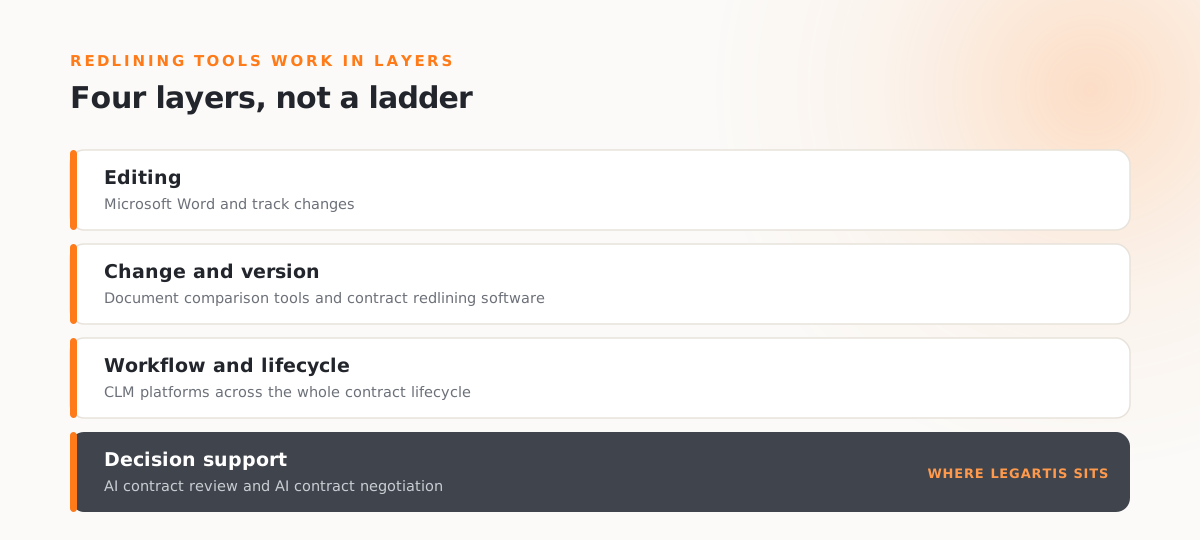
These tools do not form a strict ladder, because they solve different parts of the problem. It is more useful to distinguish a few layers:
- Editing layer: Microsoft Word and track changes. Fine for occasional contracts and low volume. Everything remains manual, and no negotiation rules are enforced.
- Change and version layer: comparison and redlining tools. They generate a clean comparison between two versions, remove the guesswork of spotting changes, and add version control, comments and a shared source of truth built for contracts.
- Workflow and lifecycle layer: CLM platforms. They manage the whole contract lifecycle, from creation and storage to obligations and renewals, with redlining as one part. A CLM is not simply the next step up from redlining software. It solves a different problem.
- Decision support layer: AI contract review and AI contract negotiation. They add a layer that reads each version and checks it against your standards, which is where the next two sections go. This can be used without first adopting a full CLM.
The right mix depends on volume and risk. The more often the same contract types repeat, and the higher the risk if a standard slips, the more it pays to move beyond plain editing towards version control, workflow and decision support. Low volume and low stakes rarely need more than editing and comparison.
How AI changes contract redlining
AI adds a layer on top of comparison and tracked changes. Instead of only showing that a clause changed, a capable system can:
- compare each new version with the previous one automatically,
- summarise the material changes in plain language,
- check those changes against a defined set of standards,
- assess whether a position falls within or outside defined rules,
- propose fallback wording,
- flag the points that need to be escalated,
- and keep the decision path recorded so it can be reviewed later.
There is an important condition attached to all of this. AI redlining is only as reliable as the standards it can apply. Without defined playbooks, fallback positions, approval rules and version context, AI can identify what changed but cannot consistently assess whether the change aligns with your standards. That makes the reliability of AI redlining a question of governance as much as of model quality, a point we explore in our piece on auditable Legal AI. Human approval also stays part of the loop, especially on high-stakes clauses. The goal is not to remove the reviewer but to give them a clear, checked starting point.
From redlines to controlled contract negotiation
This is the distinction that matters most.
Redlining shows what changed. Contract negotiation AI evaluates what the change means for your negotiation position and how to respond.
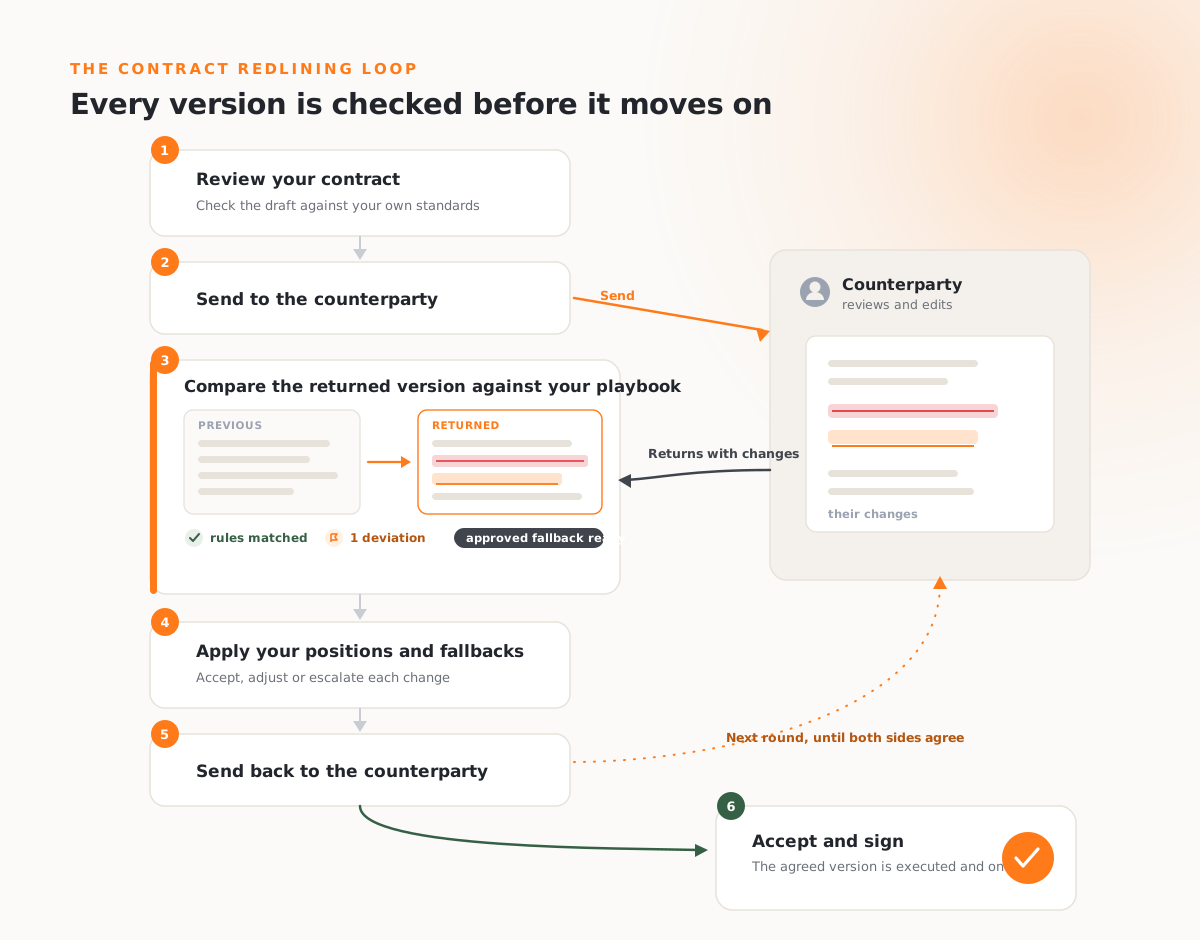
Making changes visible is necessary, but it is not the same as knowing whether a change is acceptable under your standards, or what your fallback is if it is not. Turning redlines into a controlled process means connecting three things: a contract playbook that holds your standards as rules, fallback positions approved in advance, and approval rules that decide who can accept what.
This is how Legartis approaches contract negotiation as part of the Legal AI Workspace. When a version comes back from the counterparty, it is checked automatically against your playbook. Deviations from your negotiation position are surfaced next to the rule they break, the approved fallback is offered, and the reviewer accepts, adjusts or escalates. Every applied position and approval stays traceable, and the whole process stays in one place through to signature, rather than scattered across email and separate documents. Because the work is measured against your standards rather than simply asserted to be accurate, the result is something legal can defend afterwards. You can see how that quality is measured in our AI quality system. Our guide to contract negotiation software explains how this approach differs from comparison tools and traditional redlining software.
To see controlled contract negotiation in practice, book a demo, or explore the Legal AI Guide 2026.
FAQ
Frequently asked questions
Contract redlining is the practice of marking proposed changes to a contract so that both sides can see exactly what was added, removed or reworded. It usually happens through tracked changes and comments, and it runs across several rounds until the parties agree.
You review the draft against your standards, edit the wording with tracked changes so every change is visible, add comments that explain your reasoning, get internal approval where needed, and send the new version back. You repeat this until both sides agree, then check the final clean copy before signing.
Track changes is the editor feature that records edits. Redlining is the wider practice of proposing and marking those edits during a negotiation. Blacklining, often just called a redline, is a generated comparison between two versions that highlights the differences.
Redlining documents the changes you propose, clause by clause. Contract negotiation is the wider effort of steering positions across several rounds until you reach an agreement. Redlining shows what changed, while negotiation decides what to do about it.
It depends on volume and risk. For occasional low-risk contracts, Word and track changes are enough. As the same contract types repeat and the cost of an inconsistent concession rises, dedicated software, a CLM or AI-supported negotiation become worth the investment.
AI can compare versions, summarise material changes and check them against your standards, but its reliability depends on the standards it can apply. With defined playbooks, fallback positions and approval rules, AI can assess whether a change aligns with defined standards and flag where human judgement is required. Without them, it can only show what changed. Human approval stays part of the process on important clauses.
Explore Related Insights
More articles related to this topic


Start with Legartis Today!
Talk to us about your business case or test Legartis right away!